
File permissions
File permissions are really important in security. Imagine if everyone could read and write to everybody's files and directories. It would be chaotic! In Linux, one of the ways that make ensure your files aren't read by everyone is file permissions. File permissions exist with files and are just only a number of bits, but they are really useful.
The structure of file permissions
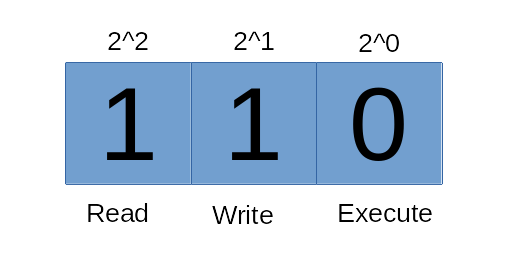
File permissions consist of three bits, the first of them is for reading permission, the second of them is for writing permission, the third of them is executing permission. If the bit is set to zero, that function is invalid. If the bit is set to one, that function can be executed. For example, a person can't execute an executable file if the execution permission bit is set to zero. Although file permissions are binary, file permissions can be presented as decimal numbers instead of binary numbers by simply adding the powers of the bits. For example, read and execute can be presented as 2^2 + 2^0 = 4 + 1 = 5.
In Unix-like systems permissions are separated to three categories, the user that owns it, the group that owns it and everyone else. Groups might be a foreign concept but it will be mentioned in the next chapters and you don't need to know it right now. These categories have separate permissions and they can be different from each other.
Information
When the parent directory has less permissions than the file, the permissions of the directory is applied rather than the files. That's a good way to prevent any file leaks.
Setting file permissions
While setting file permissions, the chmod command can be used. The chmod command has many ways to use, it supports both number and letter notation.
Number notation
Number notation includes all of the file permission information. It contains three numbers. The first number is for the owner user, the second number is for the owner group and the last number is for everyone else. These numbers are derived from the binary to decimal conversation. The command works like this:
name@computer:~$ chmod 644 text.txtThe number presents the file permissions. Actually the file number is an octal number but it's assumed that the reader doesn't have any information about numbers in different bases. It can be interpreted as a line of numbers that are derived from the binary to decimal conversation.
Letter notation
Letter notation allows people to add or delete a permission without changing all of the permissions.
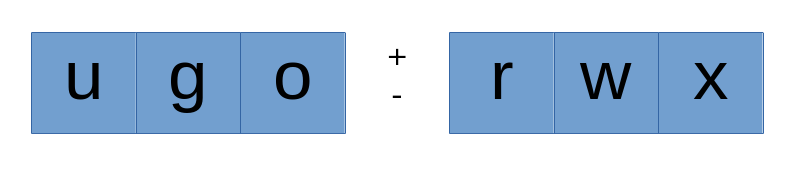
Just simply enter the category you want to change, add the sign and enter the permissions you want to change.
name@computer:~$ chmod ugo+x a.out